
Canopy - AI Online Safety App
Canopy-appLifestyle
4.0482.00 Reviews
- Version
- 2.2.20
- Installs
- 100.00K
- Age Rating
- Everyone
Screenshots



Our Review of Canopy - AI Online Safety App
 Analysis by Appyee
When I think about online safety on a shared family device, the difficult part is often not deciding that some material should be off-limits; it’s keeping that boundary useful when browsing moves between sites and images. Canopy - AI Online Safety App is built around that problem. Its content filtering can blur or block specific images in real time, giving parents an extra layer of protection beyond a simple list of websites to avoid.
That image-focused approach is the capability I find most interesting. A web filter can help with known sites, but an image may appear within a page that is otherwise ordinary. Canopy’s use of AI to detect inappropriate content aims to address that gap. I’d treat it as a practical safety aid, not a substitute for conversations about what a child might encounter or what to do when something feels uncomfortable.
Why image filtering changes the experience
The point of blurring or blocking an image is not to make every online moment perfectly predictable. It is to reduce the chance that a child sees something unsuitable while using a device for everyday browsing. That can matter when a search, link, or page takes an unexpected turn. Instead of relying only on adults to anticipate every destination, the filter adds another checkpoint as content appears.
For parents, this is meaningfully different from setting a basic list of permitted and blocked websites. Site-level controls are useful, but they can be blunt: an entire domain may be acceptable for schoolwork while one corner of it is not. Image filtering is intended to respond at a more specific level. I like the idea, though I would still check how the settings work for your family rather than assuming any filter will make every judgment correctly.
Canopy is a free lifestyle app from Canopy-app, with in-app purchases ranging from $7.99 to $119.99 per item. It has a 3.7 average from around 1,200 ratings, and has been installed over 100,000 times. It is rated for Everyone, and its current version is 2.2.8; the app first appeared on March 3, 2020. Those details help set expectations: it is an established family-safety tool, but the rating also suggests that experiences are not uniformly glowing. I’d try the free option and evaluate the controls on the devices you actually plan to protect before paying for anything.
How I would use it day to day
The useful way to approach a safety app like this is to set a clear goal before turning on every control. For example, a parent might want image filtering for a younger child’s general browsing, while allowing more room for an older teen and discussing why certain restrictions are in place. Custom filters can help make those boundaries less all-or-nothing, and screen-time limits can address a separate issue: when a device is being used, rather than what appears on it.
A realistic routine could be a child using a family tablet after school to look up a topic for homework. The filter is there in the background if a page includes inappropriate imagery, while a time limit can help keep the session from stretching into the evening. The parent can then review the rules together with the child instead of treating the app as a secret replacement for supervision. That combination—technical guardrails plus a plain conversation—is more useful than expecting software alone to teach good judgment.
It also helps to revisit settings when a child’s needs change. A filter chosen for a younger user may become frustrating for an older one, especially if legitimate material is caught. I’d make a habit of asking whether a block interrupted something needed for school or a hobby, then adjust the rules where appropriate. That small check-in can reveal whether the controls are protecting the child or simply making ordinary browsing harder.
Where the trade-offs matter
AI-based filtering is not a perfect referee. It can be difficult to balance blocking unwanted content with allowing harmless material, and any filter may occasionally get that balance wrong. A parent should be ready to deal with a false block or an unexpected miss, rather than assuming the app will interpret every image the way the family would. If a child needs broad, uninterrupted access for research, a more limited set of device-level controls may be less disruptive.
There is also a trust question. Children may experience monitoring as protection, or as a sign that a parent does not trust them; the way the rules are explained matters. I would tell a child what the filter is meant to do, what limits are in place, and how to ask for a change if a block seems unfair. That is especially important for teens, who may be better served by a negotiated approach than by increasingly strict restrictions.
Canopy’s screen-time tool and content controls address different problems, so I would avoid turning them all up at once without a reason. If the concern is late-night scrolling, a schedule or limit may be the main tool to consider; if the concern is unsuitable images, filtering is more directly relevant. Starting with the smallest set of controls that solves the real problem makes it easier to tell whether the app is helping or creating unnecessary friction.
Who is likely to benefit most
I see the strongest fit for parents who want an additional layer of image and web protection across children’s devices, and who are willing to stay involved in how those rules work. It can also suit families that want content filtering and screen-time management in one place rather than relying only on a browser setting. The ability to adjust filters is valuable when children have different ages or needs, although parents should still check each device’s setup and make sure the rules match the person using it.
It is less compelling for someone who wants a completely hands-off solution, or for a household that already has controls that meet its needs. A built-in device feature may be enough if the goal is simply to set basic usage limits. Likewise, if the main concern is a child’s online habits, not just exposure to content, a conversation and agreed routines may accomplish more than adding another layer of monitoring. Canopy is best viewed as one part of that effort, not the whole plan.
Before settling on it, I would ask a few practical questions: Does it cover the particular devices your family uses? Are the filters easy to tune when something appropriate is blocked? Can your child understand the limits and tell you when they cause trouble? And does the free version do enough for your actual needs before you consider an in-app purchase? Answering those questions during setup is a better test than relying on a feature list.
So, I recently got my hands on Canopy - AI Online Safety App, and let me tell you, it's quite the game-changer if you're worried about online safety, especially for kids. We all know how tricky it can be to keep an eye on everything happening online. That's where Canopy steps in, making the digital world a bit less daunting.
Getting Started with Canopy
First off, setting up the app is a breeze. I was impressed by how intuitive the process was. Just a quick download from the app store, a few permissions here and there, and boom—you're in. The app's design is sleek and user-friendly, so you don’t have to be a tech wizard to navigate through it.
Once you're in, the dashboard gives you a clean overview of all the controls and settings. It’s like having a digital cockpit for online safety. You can manage multiple devices, which is perfect for families with kids using different gadgets.
Features that Stand Out
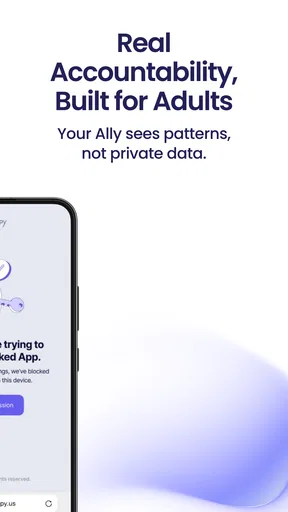
What makes Canopy really shine are its features. The app uses AI to detect inappropriate content, which made me feel like I had a super-smart assistant watching out for my family. It doesn't just block websites; it can blur or block specific images in real-time. That's pretty wild, right?
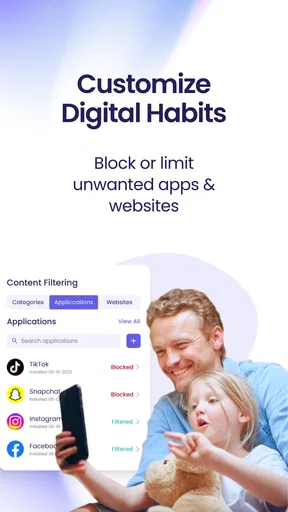
There’s also this cool feature where you can set up custom filters. So if you're okay with some sites and not others, Canopy lets you tweak that. It’s super flexible, and I loved having that level of control.
Oh, and another thing—I found the screen time management tool to be incredibly helpful. You can set limits on how long devices can be used, which is a lifesaver during homework time. No more sneaky TikTok sessions when they should be studying!
Why Parents Will Love It
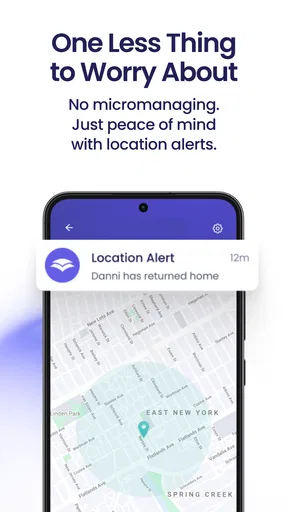
As a parent, peace of mind is everything. Canopy offers notifications that keep you in the loop, so you know if your kid tries to access something they shouldn't. It's like having a digital watchdog, but without the barking.
The app's ability to adapt and learn over time is also a huge plus. It doesn't just rely on static lists of blocked sites but learns from new online trends and threats. This dynamic approach makes it a robust tool in an ever-changing digital landscape.
Wrapping It Up
All in all, using Canopy has been an eye-opener. It’s not just about blocking content but creating a safer online environment for everyone. And the best part? It's not invasive. The app runs smoothly in the background without interrupting daily activities.
If you're looking for a way to up your online safety game, I’d definitely recommend giving Canopy a go. It’s like having a smart, invisible shield that lets you breathe a little easier in the digital world. So why not give it a shot and see how it can transform your family’s online experience?
Verdict
Strengths of Canopy - AI Online Safety App
- Comprehensive parental controls.
- Real-time monitoring and alerts.
- User-friendly interface.
- Supports multiple devices.
- Customizable safety settings.
Limitations of Canopy - AI Online Safety App
- Limited features in free version.
- Occasional false alerts.
- Requires stable internet connection.
- Subscription can be pricey.
- Setup can be time-consuming.
Similar Picks in This Category
View All
SmartThings
Samsung Electronics Co., Ltd.4.6

Google Home
Google LLC4.0

Pinterest4.2

Astrotalk - Talk to Astrologer
Astrology & Horoscope4.7

My Verizon
Verizon Consumer Group4.5

Samsung Wallet (Samsung Pay)
Samsung Electronics Co., Ltd.4.1
Frequently Asked Questions
What is Canopy and how does it work?
Canopy is an AI-powered online safety app designed to protect users, especially children, from harmful content while browsing the internet. It uses advanced algorithms to detect and filter inappropriate images and videos in real-time. The app operates across multiple devices, ensuring a safer online experience without invading privacy.
Is Canopy compatible with both Android and iOS devices?
Yes, Canopy is compatible with both Android and iOS platforms. The app provides seamless integration across various devices, allowing users to maintain consistent safety measures regardless of the device being used. This ensures flexibility and convenience for families with multiple types of devices.
How does Canopy ensure user privacy?
Canopy is designed with a strong focus on user privacy. It operates locally on your device, meaning it doesn't send your browsing data to external servers. The app performs all filtering and analysis on-device, ensuring that your personal information remains private and secure from external threats.
Can Canopy be customized for different age groups?
Yes, Canopy offers customizable settings that cater to different age groups. Parents can adjust the level of filtering and control based on their children's ages and maturity levels. This flexibility allows for a tailored online safety experience that grows with your child’s needs.
Does Canopy affect internet speed or device performance?
While Canopy operates in real-time to filter content, it is optimized to minimize any impact on internet speed and device performance. The app is designed to run efficiently in the background, ensuring that users experience safe browsing without noticeable slowdowns or interruptions.
